BlogConstruction
Change Orders That Actually Get Billed: A Simple System for Contractors
Extras agreed on site by text rarely make it to the invoice. How to price, approve and bill every change order, with a script your foreman can use today.
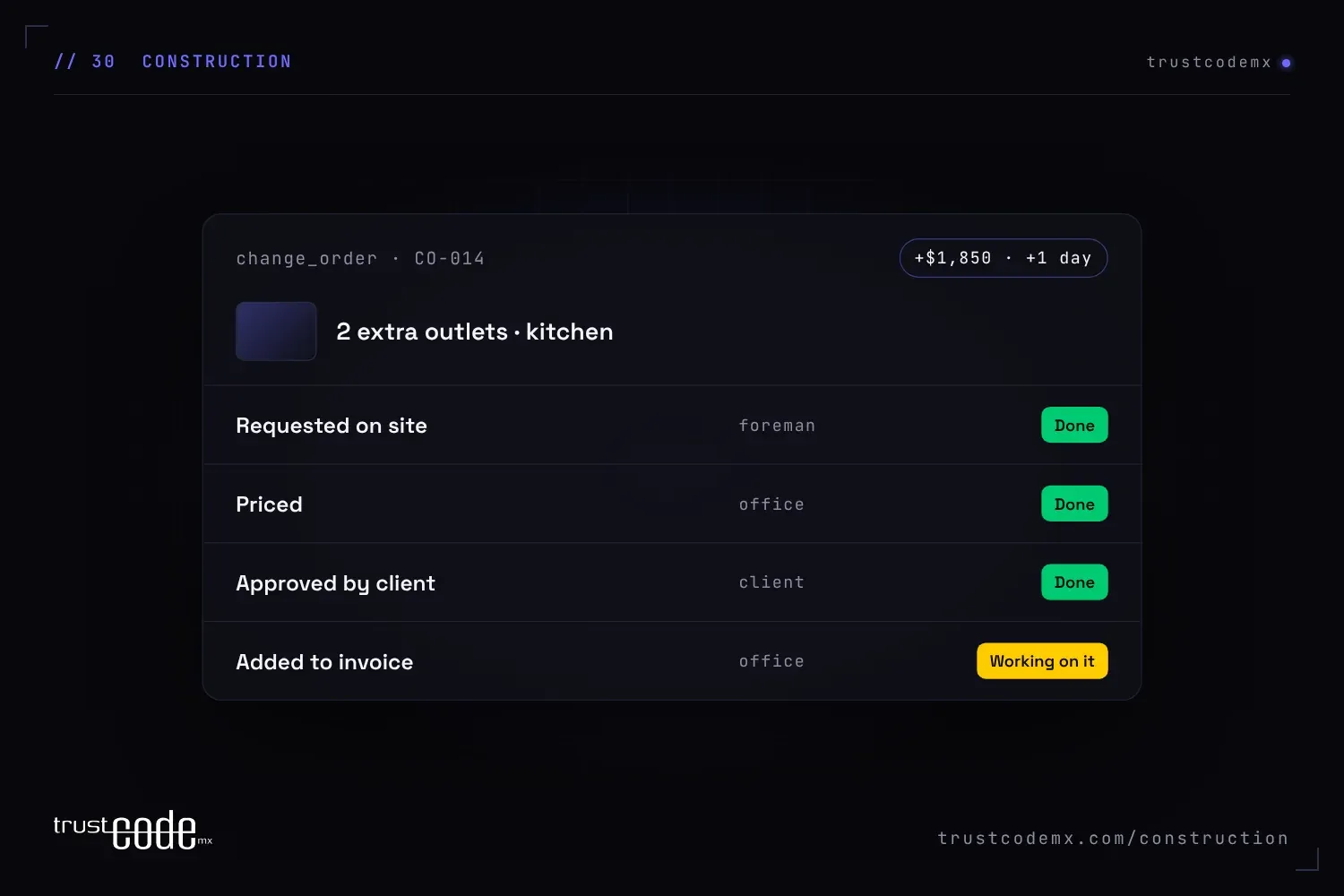
The client walks the site on Thursday and asks for two more outlets in the kitchen. Your foreman says “sure, no problem,” and the crew adds them on Friday. Three weeks later, the final invoice goes out without them. Nobody lied and nobody forgot on purpose. The change just never made it from the job site to the office.
Now picture the other version. The outlets do make it to the final invoice, and the client pushes back: “Nobody told me that would cost extra.” There’s no price in writing and no signature. You either eat the cost or argue about it at the worst possible moment, right before the last payment.
Both versions come from the same gap between the field and the office. Here’s how to close it.
Why change orders slip through
- They’re agreed in conversation. A hallway chat, a phone call or a text thread. No document, no number, no signature.
- The crew does the work before there’s a price. Once it’s built, the money conversation gets harder, and the client remembers it as a small favor.
- The office finds out late. Whoever invoices learns about the change from a receipt, a photo or not at all.
- Nobody tracks pending approvals. No one can answer “how many changes are waiting on the client right now?”
- Disputes show up at the end. When the final invoice includes extras the client never approved in writing, the conversation turns into a negotiation.
Before the job starts: read the change clause
Most contractors read the change clause for the first time when there’s already a dispute. Read it before you start, because it tells you what a valid change looks like:
- Who can approve a change. The homeowner, both spouses, or only the owner’s representative on a commercial job. An OK from the wrong person may not hold up.
- How it has to be documented. Many contracts say a change only counts if it’s in writing and signed.
- How fast you have to give notice. Some contracts set a deadline to tell the owner about extra cost or extra days. Miss it and you can lose the right to charge for them.
- How much markup you can add. Some contracts cap the overhead and profit on changes.
In some states the rule is in the law, not just the contract. In California, a change order on a home improvement contract only becomes part of the contract if it’s in writing and signed by both parties before the work starts, and it can’t be enforced against the homeowner unless it states the scope of work and the amount added or subtracted (Business and Professions Code sections 7159 and 7159.6). Rules vary by state and by type of project, so check what applies to you and ask your attorney when in doubt.
How to price a change without losing money
The most common mistake isn’t forgetting the change. It’s pricing only the materials and the hours. A complete price includes:
- Direct cost: materials, labor, equipment and any subcontractor.
- Overhead and profit: the same markup you use on your bids, unless your contract says otherwise. A change at cost is not a favor; it’s paying to do extra work.
- Time: if the change adds days, those days cost you supervision, insurance, equipment and site costs. Put the days on the change order, not just the dollars.
- Disruption: stopping one task to do another, an extra trip, a second material order. Small changes often cost more per hour than the original work.
One tool saves a lot of back-and-forth: a price list for your most common extras. An extra outlet, a recessed light, a room of paint, a linear foot of trim. With it, the foreman can give the client a number on the spot, and the office only prices what’s unusual.
What a good change order captures
Every change, no matter how small, gets a record with:
- A number: CO-001, CO-002 and so on for each job, so everyone talks about the same change.
- What changes: a one-line description and a photo of the area.
- Why: client request, hidden condition (like rot behind the drywall), a design error or your own mistake. Your mistakes go in at no charge, but they still get logged, because they tell you where to improve.
- Price and days: the amount added or subtracted and the days added to the schedule. Even “$0 and 0 days” is worth writing down.
- Approval: who approved it, when and how (signature or written reply), before the work starts.
- Status: requested, priced, approved, done, billed.
What the foreman says on site
Most changes get lost in the first ten seconds, when the client asks and the foreman answers. Give your crew a sentence to use every time:
“Sure, we can do that. Let me write it up and the office will send you the price today. As soon as you approve it, we’ll schedule it.”
It’s friendly, it doesn’t say no, and it doesn’t commit to work without a price.
If your crew speaks Spanish and your clients speak English, or the other way around, make the form work in both languages. The foreman logs the change in Spanish and the client gets the summary in English. The Spanish version of the line is “Claro que se puede. Lo anoto y hoy mismo la oficina te manda el precio. En cuanto lo apruebes, lo programamos.”
A five-step flow that works on site
- The foreman logs it from the phone. A short form with the description, a photo and the job. It takes a minute, and it happens before the crew touches anything.
- The office prices it the same day. Cost, markup and schedule impact go into the same record, not into a separate spreadsheet.
- The client approves in writing. They get the summary with the price and the days, and they sign or reply. No approval, no work. The exception is an emergency, and then it’s logged as one.
- The crew sees what’s approved. The job board shows approved changes next to the original scope, so nobody builds from memory.
- Approved changes flow to the invoice. When a change is marked done, it’s ready for the next invoice. Nothing depends on someone remembering at the end of the job.
Show the running total on every invoice
Final-invoice surprises disappear when the client sees the changes all along. Add a short block to every progress invoice:
| Item | Amount |
|---|---|
| Original contract | $48,000 |
| Approved changes to date (CO-001 to CO-004) | + $3,150 |
| Revised contract | $51,150 |
| Billed to date | $30,690 |
| Balance | $20,460 |
Example numbers. With this block, the final invoice is never the first time the client sees a change.
What to review every week
- Changes waiting for client approval, and for how long.
- Changes that are approved and done but not billed yet.
- Approved changes per job compared to the original contract.
- Changes by reason. If most come from hidden conditions, improve your pre-construction walkthrough. If most come from the client, lock in selections before the job starts.
- Jobs where changes keep pushing the finish date.
That last one is also a good conversation with your clients: a job that keeps changing is a job that will finish late, and it’s better to say so early.
Where to start this week
Don’t wait for new software. Starting Monday, set one rule: no extra work without a written record and a price. Give your foremen the sentence above and a list of prices for your ten most common extras. Even a shared form beats a text thread. Once the habit sticks, connecting it to your job board and your invoicing is the easy part.
We build job management systems for contractors: every change logged, approved and billed, with the client informed along the way.
Book your free assessment · 30-minute call. Free.
Frequently asked questions
Is a text message enough to approve a change order?
It’s better than nothing if it’s saved with the job record and says what changes, how much it costs and how many days it adds. A signed summary is better. Some contracts and some state laws require a signed change order before the work starts, so check what applies to your job.
How much should I mark up a change order?
Use the same overhead and profit you use on your bids, unless your contract sets a limit. Add the cost of extra days and the disruption to the crew. Pricing a change at cost means you pay to do extra work.
What if the change is an emergency?
Do the work, then log it right away with photos and a note on why it couldn’t wait. Send the client the summary with the price the same day.